Your text. Across desktops.

Keep your best words within reach

Keep prompts, code and everyday replies in one private library. Move your data between macOS, Windows and Linux, protect it with encryption, and work offline.

macOS · Windows · Linux
  • Cross-platform data
  • Encryption & privacy
  • Works offline
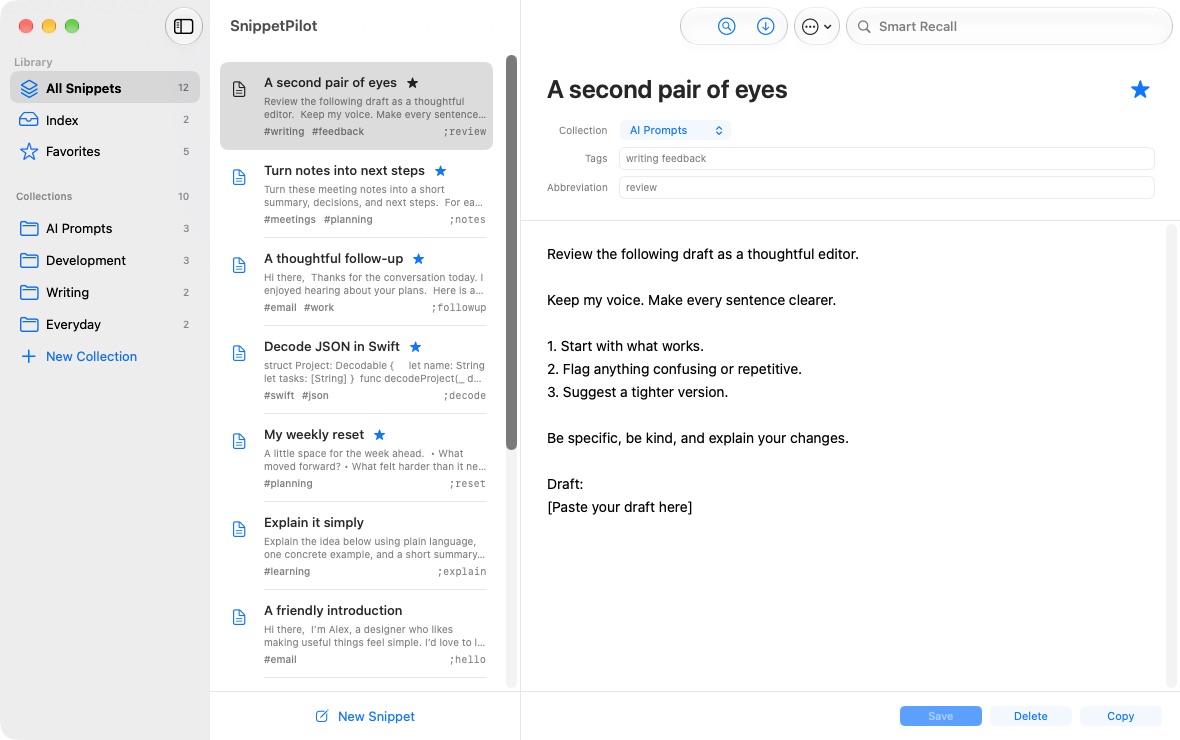
SnippetPilot on macOS: collections, snippets and the editor

SnippetPilot on macOS · See screenshots by platform

Who is it for?

For people who already have good text — and want to stop finding or typing it again.

People who work with prompts

Keep reusable instructions, constraints and prompt building blocks together. Change shared project details with variables, then copy into your AI tool. SnippetPilot does not call the AI for you.

Developers

Keep commands, code fragments and setup notes close. Search and copy instead of hunting through old projects. Review commands before running them.

Support and operations

Reuse clear answers, checklists and recurring messages. Personalize before sending; your snippets stay on your device.

Everyday writers

Keep introductions, signatures and frequently used text organized. Replace a pile of temporary notes with a small local library.

Why SnippetPilot?

Compatible data, across desktops. Move snippets, collections and variables between macOS, Windows and Linux using supported library exports. Your work does not have to stay on one operating system.

Private text, protected. Use encryption for sensitive data and password-encrypted exchange files for transfers. Plaintext exports and the clipboard need your care too.

Offline means yours. Work without an account or cloud connection. You choose what to save and where to keep your backups. Free for personal and commercial use.

Less retyping. More doing.

A small set of tools for the text you use every day.

Explore all features

Write once, copy anywhere

Keep reusable text in one searchable local library.

Shared details, always current

Use global variables for values you reuse across snippets.

Quick Panel

Find a snippet and press Enter to copy. Then paste where you need it.

Quick Capture

Copy text, open capture, review and save. You choose what stays.